Xfce4 Display Settings status
As promised, here comes the post about recent changes in Xfce4 Display Settings. For those who do not know, Xfce4 Display Settings is the dialog which allows you to set the screen resolution, refresh rate, to activate external monitors, etc.In Xfce 4.6, it only had one problem: it was totally useless and not working.
Then came mr_pouit, who decided it was time to clean that mess! He started to dig in the xrandr code to understand how the kryptic Randr API works and to bring that sweet magic to Xfce. So what do we have at the moment?
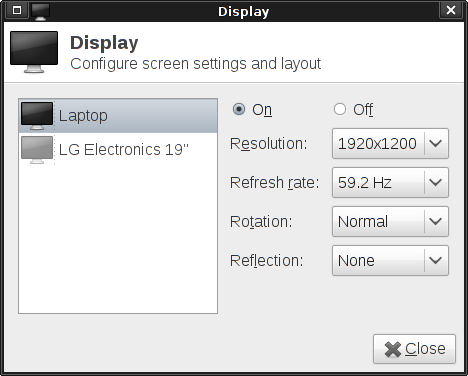
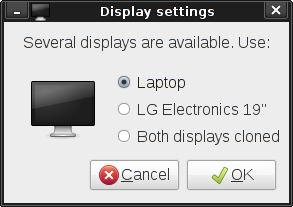
The new dialog is at the moment almost similar to the old one, except that every thing should work correctly and that it is rocking simple to use! We also added some goodies such as timed confirmation for critical changes and a simple dialog which can be called with the media keys or with Win + P to quickly configure an external output.

But there is more to come! First, we are still working on fixing bugs, simplifying the code to make it rocking stable and awesome like Barney's suit. Then, we are planning a lot of UI improvements, the biggest one being a graphical way of setting the screens' layout : it will allow the user to set the relative positions of external monitors. We hope to have that done in the next two weeks, but it could take a little more time. And yes, that'll mean that 4.8 TODO list will have lost one item 
Comments
The UI doesn't need a lot of work (although the choice of widgets still conveys a weird, backwards relationship between the list on the left and the radio/combo buttons on the right) but that's certainly an improvement.
I'd just settle for whatever non-xfce-related component is responsible for handling modesetting, making available more than just the maximum refresh rate, for the various resolutions available on my monitor/HDTV. As it is, I have to append settings to GRUB for KMS and add and apply 50hz settings via xrandr in a shell script, launched by my .xinitrc, just so my TV has all it's features available (things like 100hz Motion Plus and contrast settings are unavailable at 60hz).
Ni-hice!
Icaria: KMS and stuff like that is not supposed to be handled by a display settings applications, it's supposed to be handled at the boot level. Re your refresh rates problems, I'm afraid it's a X.org problem, we just use the values that are reported to be available.
Vincent: Thanks!
will it be integrated in xfconf?
bluebird: I don't really get what you mean, but it does use xfconf to save the settings, yes.
I have a question about the current Display Settings menu: when I plug in an extra display in my laptop it works perfectly but the Display Settings menu won't show it; it always shows one. Is this one of the reasons you are saying that it is "totally useless and not working" or is this issue only ocurring in my linux box?
Thanks for the hard work.
I'm using Xubuntu 10.10 on a Compaq Evo N1020v and I can't get external displays to work (though the plug is working because at start up it shows 'Compaq'). Xfce4 shows only one display in its list but Multiple Displays and ARandR show the additional screen. I presume the external display isn't working because Xfce4 takes precident. Any help for a Linux idiot?
Thanks,
Matt
oh, and where does it store its settings because I could really cause damage with access to that file?!
Thanks,
Matt
_Very_ nice work !
How is the status about setting the position of screens?
I would really like this, 'cause it's a mess to do this on the terminal...
Greets, penelov